Saturday, January 26, 2008

Samus Learns the Moves
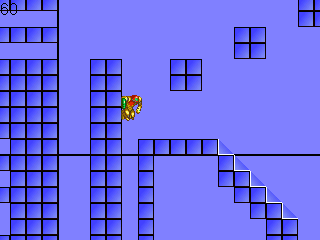
By January of 2006 the project had the basics. It was time to add the signature abilities. Every time I added a new move, even basic stuff, I tested it. I made a test level for each one, so I could test the new ability in every possible situation. Once everything was working correctly, I compared it to the original games to do some fine tuning.

For example, I added the MorphBall. It´s simple, but it required the following items to work correctly:
  • Change Samus´ collision so she is actually smaller and can fit small holes.
  • Add a morph and unmorph animation.
  • To morph correctly the crouch state change must be working, so you morph by double tapping Down.
  • Rolling on the ground and falling in the air have different animations.
  • Samus can morph and unmorph in the air. She also needs a double tap (one to aim down, one more to morph).
  • Morphing or unmorphing in mid-air resets the speed.
  • Whenever you unmorph you should check if there is enough room above to fit Samus.
  • Falling from a determined height makes Samus bounce a bit.
  • After unmorphing Samus goes to Crouching State, not Standing!

And this is just MorphBall. Other abilities are much more complex to implement properly. So AFTER checking everything I moved on to the next move.

Walljump! Actually it wasn´t hard to make.

PowerGrip was tricky, specially to align it right.

That´s 2 sprites, the legs and the torso (it changes depending on the aiming direction)

I struggled a lot to make the SpiderBall work.

ScrewAttack with some more eye candy.

SpeedBooster Test Levels were the best. I made some naughty shinespark puzzles.

The first beam, with all the aiming directions.


BombJumping! And that´s the first tileset I ripped.

All of Samus´ abilities were done in about a month. I had plenty of free time back then, and I could work on the project many hours a day.
By this time I really thought the project could be finished in a couple of months, but life had different plans.

Saturday, January 19, 2008

Mimicking a Classic

December 2005, the game is starting to shape.
It took almost a week to understand the engine, and to start modifying it without beaking anything. I tweaked the animation system, now it flipped the sprites instead of having a left and right version of every sprite. I added the first custom states: Morphball and Spinjump.

One of the first test rooms.

Trying out the Morphball.

The new states worked really well. But before adding anything else the few elements already done should be working correctly. So, instead of adding more abilities, I tweaked Samus´ physics to make the game feel right.
Emulation is a great tool to understand how things are made in games. So, I used VBA to take a closer look to basic things. I took frame by frame snapshots of the basic actions, then arranged them using Paint Shop Pro and compared the changes between frames. This revealed how fast Samus runs, how many frames does it take to morph, powergrip, etc.

The initial running acceleration.

The powergrip animation, vertical sprite offsets of each step.

This helped a lot to establish a goal regarding basic gameplay. All the subsequent tweaks were now heading to a clear direction. I knew what I was looking for.

Thursday, January 10, 2008

Game Design - The beginning

Designing a game is challenging. It requires the designer to know exactly what he's looking for in the game even before writing the first line of code. In order to make a succesful Metroid game, I had to study all the games, understand how they work, and then design my version.

When I contemplated the idea of a remake, I did the most obvious research first: Play the original again. I have to recognize, I kinda cheated. I played it on a Super GameBoy cartridge, instead of the original GameBoy. Most of the atmosphere and desperation was lost because of playing in a comfortable TV, just because batteries are really expensive here in Argentina.
I also used a printed version of a map I found in GameFaqs, so I didn't get too lost.

It was a great experience to play it again so many years later, suddenly the game was a lot easier than before, except of course the final battle. Playing with a B&W color sheme and the lights off is quite a trip.

Having completed and learned the "feel" of Metroid 2, I researched on everything I could find about the game. The story, Samus' backstory, secret worlds, etc. Tool Assisted Speedruns pushed the little game's limits and showed how you could skip entire areas by diving into lava.

Then came Super Metroid. It was hughe, until now I hadn't completed the game. This was a good excuse to play the best platform game on the SNES. After that I played again Zero Mission and Fusion, paying a lot of attention to how the engine works. Physics, frictions, speeds, jump heights, how walljump works, etc. Speedruns of Zero Mission are very interesting, since the game was designed with speedrunning in mind. It was then when I set my first design goal: The player must be able to play like this in my game.

So, I had the game in my mind finally:
- Zero Mission style graphics
- Samus should be fast and versatile like in ZM, so exploring would be easier
- The game should run smoothly, preferably at 60 fps
- There will be shortcuts for the speedrunning player

I then started with the engine. The most stable platform engine I found was Martin Piecyk's, it is solid and easy to customize. I ripped some of Samus' sprites using VBA and placed them into the engine. In a matter of minutes Samus was already jumping and running.
Having a platform game featuring Samus is easy. But making a full fledged Metroid game would be a challenge.

Friday, January 4, 2008

Screenshots!!!

Ok, I'll show you the current state of the project. Anyway, this is all I'm gonna show you until I manage to make a trailer video. These screenshots compare the original gameboy places with my version.


Some aspects of the game design:

- The game will be as linear as the original. No open exploration, you HAVE to kill the Metroids of each area like in the original. However, I'm thinking of adding a Time Attack mode, with a lot more freedom to explore.
- Right now it plays a lot like Zero Mission. The upgrades available are the following:
  • MorphBall
  • Missiles
  • Super Missiles
  • PowerBombs
  • Spider Ball
  • PowerGrip
  • SpeedBooster (complete with Shinespark)
  • JumpBall
  • Hi Jump
  • ScrewAttack
  • Space Jump

- Spider Ball works just like the original one. It can grip in any surface, but it's really slow.
- PowerGrip has more animation frames than Zero Mission.

Weapons:

  • Charge Beam
  • Ice Beam
  • Spazer Beam
  • Wave Beam
  • Plasma Beam

- The beams can be stacked. Each one can be turned on/off on the fly. All four can be active at the same time, unlike Super Metoid.
- Missiles have splash damage. The whole damage is divided between the direct impact and the explosion. Super Missiles won't affect the game difficulty during Metroid fights.
- Samus can walljump, just like in Zero Mission.

Next week I'll show you more screens, up to the first Chozo Ruins.
Feel free to comment about these first images.

See ya!

Thursday, January 3, 2008

About the Project

Hi. My name is Milton. I live in Argentina, where I work as a sound technician in my own recording studio. This is a project I've been working on for over two years, and now I feel it can be finished, so I decided to make it public.


This is my own remake of Metroid 2, one of the most important chapters of the Metroid saga. I always wanted to play the game with the graphics and physics of Metroid Zero Mission. So, I decided my next game would be a remake.

During the next weeks, I'll share with you the progress so far. I'll post screens from the very beginning of the project, until its present state. I also documented some of the most important aspects of the game design.


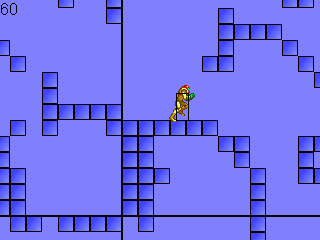
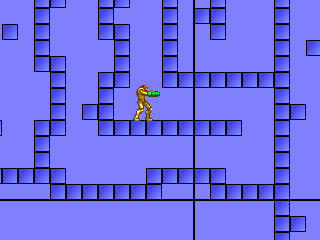
<- This, for exampe, is one of the early test builds. I am using Game Maker 6, and used Martin Piecyk's Platform Game template as a starting point. His excellent engine provided solid platform physics, and state based characters. The engine is also easily customizable, so I could add all the states I needed for Samus.


So, stay tuned for the next update, I'll show you some more screens and reveal some gameplay details.